
TL;DR
Prebuilt AI workstations now often match or beat DIY on price, thanks to bulk buying and component shortages. Decide based on speed, support, and how much control you want over tuning and upgrades.
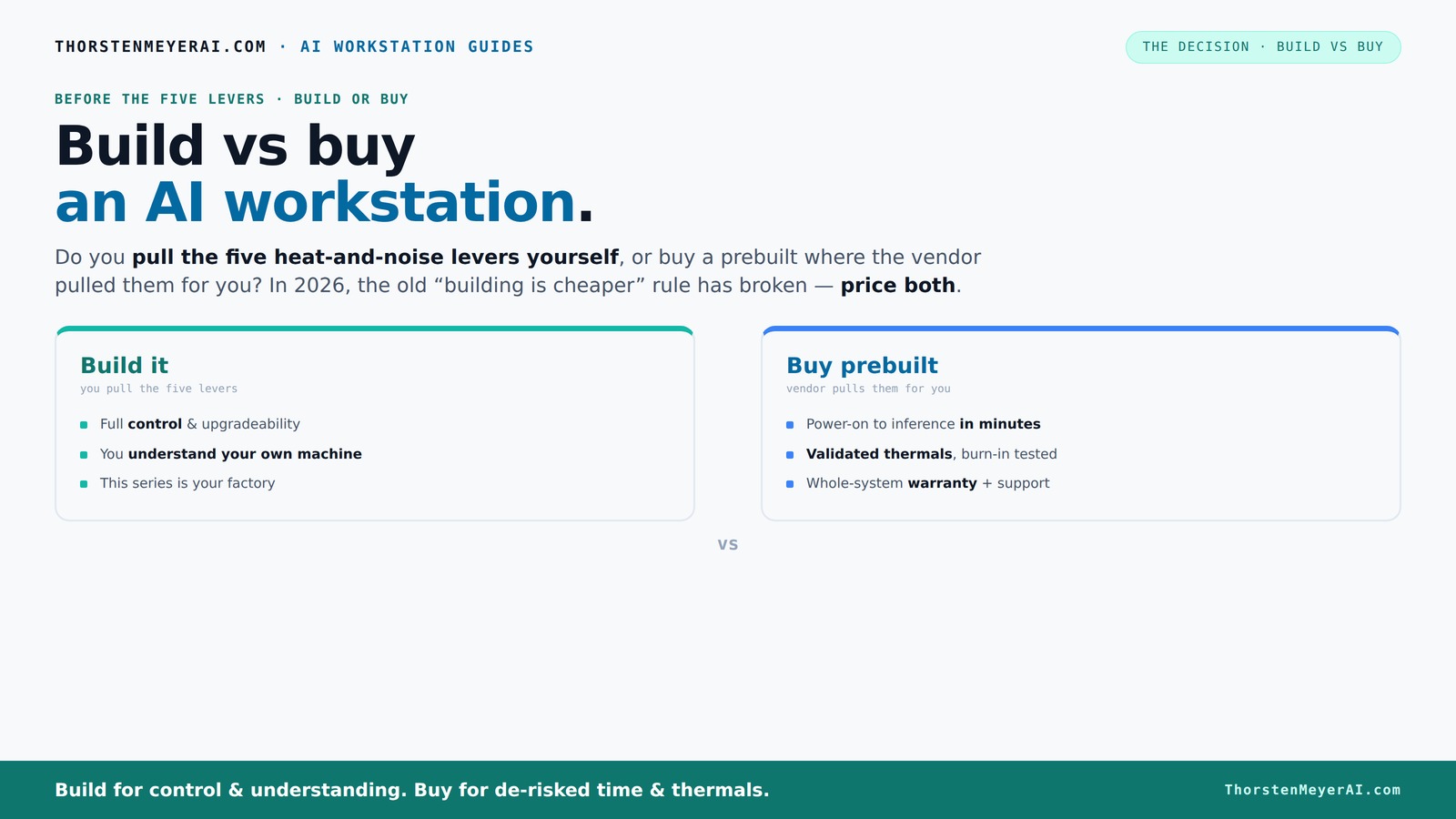
Imagine firing up your AI project and having everything just work — no fuss, no troubleshooting, no waiting. That’s what a prebuilt AI workstation offers in 2026. But if you love tweaking, customizing, and controlling every detail, building your own is still a strong contender. The game has changed. The old rule — build cheaper, buy faster — no longer holds reliably.
This guide cuts through the hype. We’ll compare costs, performance, support, and future-proofing for both options — so you can pick what fits your needs today, tomorrow, and beyond.
Build vs buy
an AI workstation.
The real question behind this whole series: do you pull the five heat-and-noise levers yourself, or buy a prebuilt where the vendor pulled them for you? And in 2026, the old “building is cheaper” rule has broken. Match your situation in Part 3.
Key Takeaways
- Component shortages and bulk buying in 2026 make prebuilt AI workstations often match or beat DIY costs.
- Prebuilts handle thermal tuning, noise reduction, and validation, saving time and reducing risk.
- Custom builds offer superior upgradeability and control but require more time, knowledge, and potential troubleshooting.
- Support and warranty are strong points for prebuilts, providing peace of mind during critical AI workloads.
- Your choice depends on whether you prioritize speed and support or control and future-proofing.

WIWB Gaming PC Desktop Core I9-14900HX, GeForce RTX 5060 Ti 8G, 16G DDR5 RAM, 1TB NVME SSD, WiFi 6, 4K 8K High-End Prebuilt PC Computer Tower for Streaming, Video Editing & Workstation Use (Black)
UNSTOPPABLE PROCESSING POWER: Powered by the Intel Core i9-14900HX processor (24 Cores, 32 Threads) with a max turbo...
As an affiliate, we earn on qualifying purchases.
As an affiliate, we earn on qualifying purchases.
Why Price Tags in 2026 Make Building No Longer a Clear Winner
Building your own AI workstation used to be cheaper. Not anymore. Component shortages, inflation, and bulk buying have driven prices up across the board. A DIY build that used to cost around $1,000 now easily hits $1,250+ before software and OS costs.
Meanwhile, prebuilt vendors like Lambda and Puget have locked in bulk discounts, allowing them to offer systems at prices close to or even below what you'd pay piecing it together. This shifts the economic landscape. The key implication is that the traditional advantage of DIY — lower initial costs — diminishes, making the decision more about convenience and time than just price. You might pay more for the prebuilt, but you save hours of research, compatibility troubleshooting, and assembly time. This tradeoff matters because in AI workloads, time-to-deployment can be critical, and the hidden costs of building can offset potential savings.

STORMCRAFT Falcon AI Gaming Desktop Computer AMD Ryzen 7 7800X3D, RX 9070 XT 16G, 32GB DDR5 6000MHz, 1TB NVMe SSD, 850W PSU 360mm AIO, ARGB Fans, USB-C, Bluetooth, Wi-Fi VR Ready PC Game Design Office
Powerful Gaming Performance: R7 7800X3D CPU(8 Cores 16 Threads, 5.0GHz max) paired with RX 9070 XT 16GB delivers...
As an affiliate, we earn on qualifying purchases.
As an affiliate, we earn on qualifying purchases.
How the 'Heat and Noise' Levers Decide Who Pulls Them
Cooling and noise management are the secret weapons in high-performance AI workstations. Prebuilts come with the vendor handling these details — validating thermals, tuning fan curves, and often including water-cooling for quiet operation. Think of it as a factory performance tune-up, which ensures the system runs efficiently and quietly, reducing the risk of thermal throttling that can degrade performance during long training sessions. This is especially important because sustained workloads generate significant heat, which if unmanaged, can cause hardware degradation or instability. The implication is that prebuilt systems offer a more reliable baseline for demanding tasks, saving you from the trial-and-error of tuning cooling solutions yourself.
DIY builders, on the other hand, get to pull those levers themselves. You choose a quiet GPU like the RTX 4090 with a custom undervolt, pick a near-silent cooler, optimize airflow with specific case fans, and position it where noise and heat won’t bother you. This control allows for tailored solutions that can minimize noise and maximize thermal performance based on your environment and workload. The tradeoff is that this requires time, expertise, and an understanding of thermodynamics. If done right, it can yield a quieter, more efficient system, but missteps can lead to overheating, noise, or hardware failure. The key is that this customization impacts not just comfort but the longevity and stability of your system, which is crucial for continuous AI training or inference tasks.

High-Performance Computing with C++26 and CUDA 13: A Practical Guide to GPU Programming, Parallel Computing, and Scalable Systems for AI and Machine ... engineering and programming books)
As an affiliate, we earn on qualifying purchases.
As an affiliate, we earn on qualifying purchases.
Performance and Workload Fit: Which Is Better?
Performance is king in AI. Both prebuilt and custom systems can pack the same cutting-edge GPUs like the RTX 4090 or A100s, with 24-48 GB VRAM for training and inference. But how they’re tuned matters because optimal performance depends on more than just raw specs. Proper thermal management, driver optimization, and system tuning can make a significant difference in real-world throughput and stability.
Prebuilts are often optimized at the factory for balanced performance, thermal stability, and quiet operation. They run stress tests and validate that your system won’t throttle under load, which means less guesswork and immediate reliability. This is especially important for users who need predictable performance without delving into complex tuning.
Custom builds allow you to squeeze out every ounce of performance — choosing specific CPU-GPU combos, overclocking, or adding custom cooling. For instance, a DIY user might undervolt the GPU to reduce heat, enabling higher sustained loads, or overclock the CPU for faster data processing. These choices can significantly boost performance but require expertise and careful monitoring. The takeaway is that performance isn't just about the parts but how you assemble and tune them. The tradeoff is effort versus immediate plug-and-play reliability, which can be decisive depending on your workload urgency and technical comfort.

NVD RTX PRO 6000 Blackwell Professional Workstation Edition Graphics Card for AI, Design, Simulation, Engineering - 96GB DDR7 ECC Memory - 4th Gen RT/5th Gen Tensor Core GPU - OEM Packaging
[NVIDIA Blackwell Streaming Multiprocessor] The new SM features increased processing throughput, and new neural shaders that integrate neural...
As an affiliate, we earn on qualifying purchases.
As an affiliate, we earn on qualifying purchases.
Support, Warranty, and Risk: Who Has Your Back?
If support matters, prebuilt systems shine. Vendors like Lambda or Puget offer comprehensive warranties — up to 5 years in some cases — with on-call support ready to troubleshoot hardware or software issues. They test extensively before shipping, reducing your risk of failures. This support network can be crucial during critical AI experiments or production runs, where downtime costs are high. Having a dedicated support team means faster resolutions and less stress, allowing you to focus on your work rather than troubleshooting hardware problems.
DIY builds mean you’re the support team. When something goes wrong — a failed PSU, incompatible BIOS, or a dodgy RAM stick — you’re on your own or paying for local repair. The upside? You control the repair process, can choose parts, and upgrade more freely. However, the risk is higher because troubleshooting can be time-consuming, especially if you're unfamiliar with hardware or face obscure compatibility issues. The implication is that support and warranty are significant considerations, especially for professional environments where reliability and uptime are critical. Investing in prebuilts can be a safeguard against unexpected failures that disrupt your AI workflows.
Upgradeability and Future-Proofing: Can You Grow With It?
Custom builds generally win here. They use standard parts and open connectors, making upgrades straightforward. Want a bigger SSD, faster RAM, or a new GPU? Just swap it in. This upgradeability is vital because AI workloads and data sizes grow rapidly, and the ability to upgrade without replacing the entire system can save significant costs and time. For example, adding more VRAM or upgrading to a newer GPU can extend the lifespan of your workstation and adapt to evolving AI models.
Prebuilt OEM systems sometimes use proprietary components or connectors, making upgrades tricky or impossible without replacing the entire system. This can limit your options as your AI needs grow, forcing costly replacements sooner than you'd like. The implication is that for long-term investments, DIY systems often provide better value, enabling incremental upgrades aligned with your project’s evolution. It also means you can adapt your hardware to new AI frameworks or larger datasets without major overhauls, maintaining performance and reducing future costs.
Hidden Costs and Pitfalls of Building Your Own
Building can seem cheaper, but beware the hidden costs. Time spent sourcing parts, troubleshooting compatibility, and tuning cooling adds up. Plus, if you make a mistake, fixing it costs more — in time, money, and frustration. For instance, selecting the wrong PSU can cause instability, or mismatched RAM can lead to boot failures. These pitfalls are common for DIY builders and can significantly delay your project or increase costs if not anticipated.
Moreover, the need for trial-and-error in tuning and troubleshooting can extend your setup timeline and inflate expenses. You might also face compatibility issues that require replacing parts or adjusting configurations, which can be costly and time-consuming. Support costs are another consideration: DIY systems typically have separate warranties for each component, so if something fails, you must coordinate repairs yourself. This can lead to unexpected downtime or expenses, especially if you lack technical expertise. Being aware of these hidden costs and planning accordingly can help you avoid costly missteps and ensure your investment is worthwhile.
When a Prebuilt System Is Your Best Bet
If you need a system ready to go, with validated thermals and support, prebuilts shine. They save you setup time and reduce the risk of compatibility issues. For AI workloads, that means less downtime and more productivity. This is especially true in environments where reliability is paramount, such as enterprise AI deployments or time-sensitive research projects. Vendors like Lambda or Puget have tested their systems under sustained loads, ensuring thermal stability and performance consistency, which is critical for avoiding costly interruptions.
In scenarios where rapid deployment and predictable performance are essential, prebuilts outperform DIY options. For example, in a production environment where downtime could cost thousands of dollars per hour, the assurance of a tested, supported system provides peace of mind. These systems are also ideal for users who lack the time or expertise to assemble and tune hardware, allowing them to focus on their core work. The key is that prebuilts reduce setup complexity and deliver assured performance, making them the optimal choice for mission-critical AI applications in 2026.
When Custom Builds Win on Control and Long-Term Value
If you thrive on control, or want to tailor every part to your workload, building your own workstation makes sense. You pick exactly the CPU, GPU, cooling, and storage — no compromises. This level of customization allows you to optimize for specific AI tasks, such as overclocking for maximum throughput or integrating niche hardware like tensor cores for specialized workloads. For research labs or hobbyists pushing hardware to the limit, this control is invaluable because it enables continuous tuning and upgrades aligned precisely with evolving project demands.
Additionally, custom builds often have better long-term value because you can incrementally upgrade components, extending the system’s lifespan and adapting to new AI models or datasets. For example, a researcher might start with a mid-range GPU but upgrade to a top-tier model as budgets allow, or add more RAM as data sizes grow. This flexibility ensures your investment remains relevant and performant over several years, whereas prebuilt OEMs may lock you into a fixed configuration, forcing costly replacements when your needs change. The implication is clear: for those who want to control every aspect of their system and maximize long-term ROI, custom building remains the superior strategy in 2026.
Frequently Asked Questions
Is it cheaper to build or buy a prebuilt AI workstation?
In 2026, component shortages have pushed DIY costs higher, and bulk buying allows prebuilts to often match or beat DIY prices. Always price both options with your exact specs.Which option offers better performance for running large language models or inference tasks?
Both can deliver high performance. Prebuilts often optimize thermals and tuning out of the box, while custom builds can be fine-tuned for maximum output, especially for specific workloads.How much do I lose if I buy instead of build?
You might lose some control over component choice and future upgrades. However, you gain in support, warranty, and immediate readiness, reducing setup time and troubleshooting.What specs matter most for AI workstations: GPU, VRAM, CPU, or cooling?
GPU VRAM and compute power are critical for training large models. CPU matters for data loading and preprocessing. Cooling impacts sustained performance. Balance all based on workload.Are prebuilt AI workstations easier to upgrade later?
Generally yes. They often use standard components, but some OEM models may limit upgrade options due to proprietary parts. DIY systems usually have more flexible upgrade paths.Conclusion
In 2026, the decision between build and buy isn’t just about costs anymore. It’s about what matters most — speed, support, or control. If you want to get started quickly without surprises, a prebuilt system is your best bet. But if you love tuning, upgrading, and customizing, building your own can still pay off.
Imagine your perfect AI workstation: quiet, powerful, and ready when you are. The choice is yours. Just remember, the best system is the one that fits your specific needs today and can grow with you tomorrow.